At school, we come to learn, not to surf.
With PoE-Sea, the Wi-Fi already installed is switched on classroom by classroom when a teaching activity needs it, and switched off when it is no longer useful.
Nothing to replace: a small box is added to the existing installation.
Propose a pilot project Our approachDigital tools chosen, not imposed
Digital tools must serve learning, and not set the rhythm of the children's day.
Learning to disconnect
The pupils experience that one can learn, play and talk without being connected all the time. The connection becomes a choice of the teacher, for a precise activity.
Teams and families on board
We support the teachers with the teaching guide « École numérique 3.0 », and the families with an illustrated booklet for parents.
Measured results
Each pilot project is evaluated on the ground: its teaching, economic and environmental benefits.
Why manage the Wi-Fi of the school?
In most schools the Wi-Fi is on 24 hours a day, 365 days a year, even though the pupils use it a few hours a day.
Less screen time
The teacher switches the Wi-Fi on when the class needs the internet, and it goes off by itself after the lesson.
Screen-free periods, breaks and evenings are guaranteed by a weekly schedule, and the statistics show how long each classroom was online.
Lower power consumption
An access point uses power day and night. A school is used about 1 300 of the 8 760 hours of the year.
PoE-Sea cuts the power of the access points the rest of the time: up to 85% less electricity for the wireless network, and less heat in the technical rooms.
Better security
A Wi-Fi network that is off cannot be attacked. Outside school hours, at night and on weekends, the school network is not reachable from the car park.
The switches can be locked, and every switching on is logged: you see when and where the Wi-Fi was used.
This is how PoE-Sea works
PoE-Sea works with the access points you already have, whatever the brand.
Nothing to replace in the lighting or the infrastructure: the solution is simply added to what exists. Designed to last and covered by a lifetime warranty, it keeps the investment of the school limited.
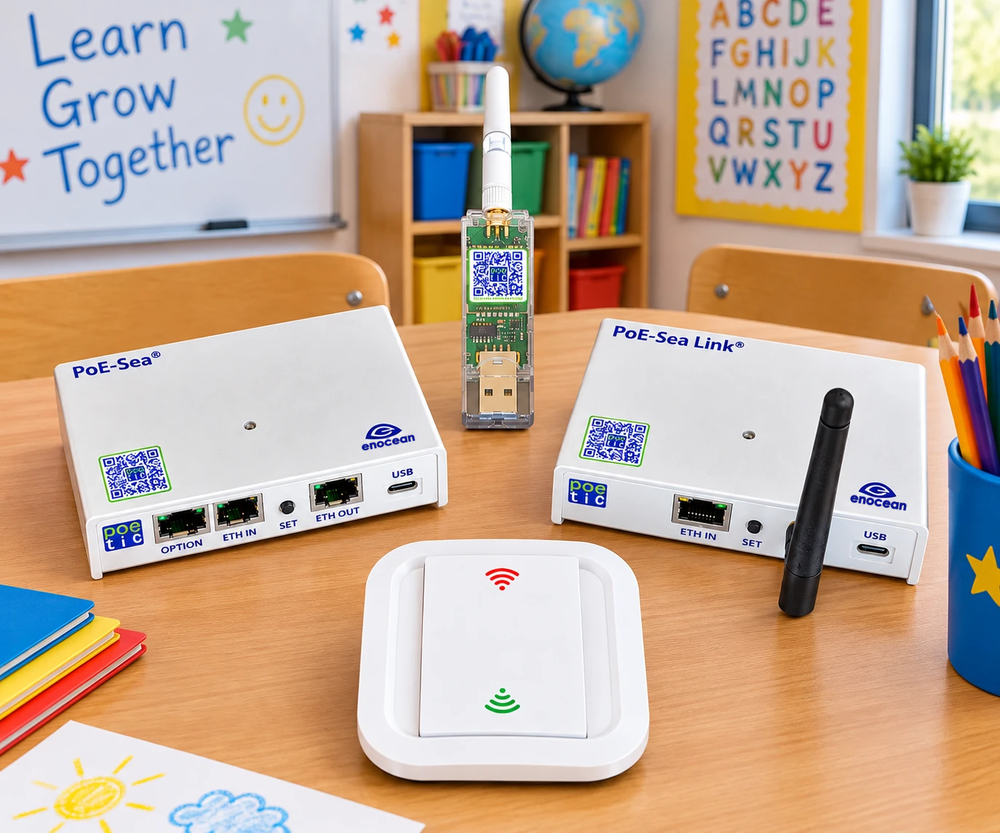
PoE-Sea+
Installed between the PoE switch and the Wi-Fi access point. When it cuts the PoE power, the access point is off: no Wi-Fi, no radio waves and no power consumption.
Switch without battery
An EnOcean radio switch on the wall or on the desk of the teacher. It takes its energy from the press of the finger: no battery to change, no cable to pull.
PoE-Sea Link
The gateway connects the PoE-Sea+ of the building to the PoE-Sea cloud service, for the remote control, the schedules, the statistics and the software updates.
Schedule and locks
Each PoE-Sea+ follows its weekly schedule, also without internet: Wi-Fi off at the end of the day, switches locked during breaks, at night and on weekends.
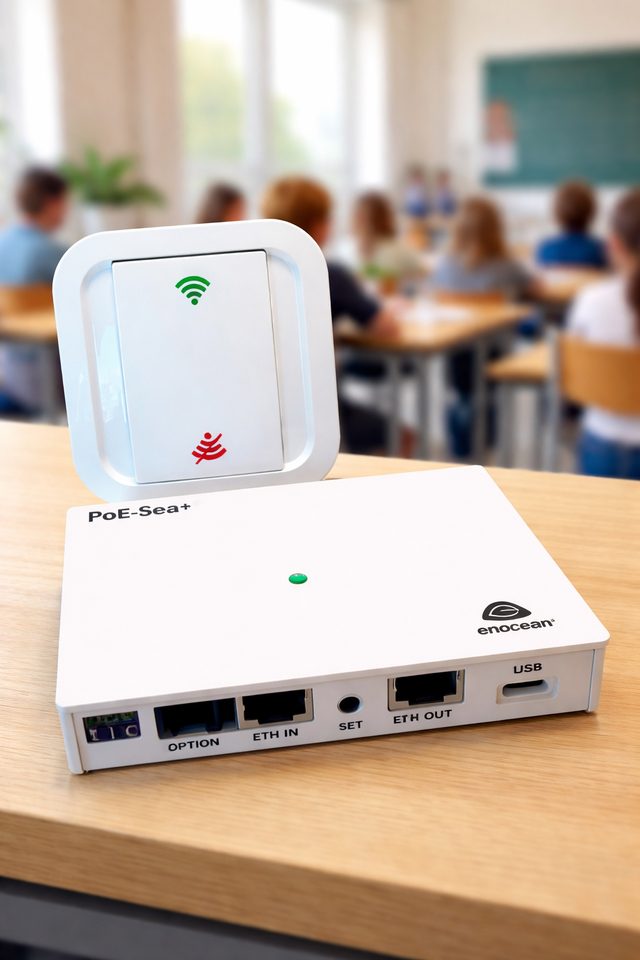
A simple gesture for the teacher
- Press on: the access point of the classroom gets power, and the Wi-Fi is back as soon as it has started.
- Press off, or let the delay run out: the access point is switched off.
- Up to 8 switches per PoE-Sea+, for example one by the door and one on the desk of the teacher.
- A time quota can limit how long the Wi-Fi can be on.
- No new network, no new password: the pupils' devices connect as before.
One overview for all the schools of the municipality
The PoE-Sea cloud service shows every building, every PoE-Sea+ and every switch. Change a schedule, switch a classroom on or off, or follow the use of the Wi-Fi, from any browser.
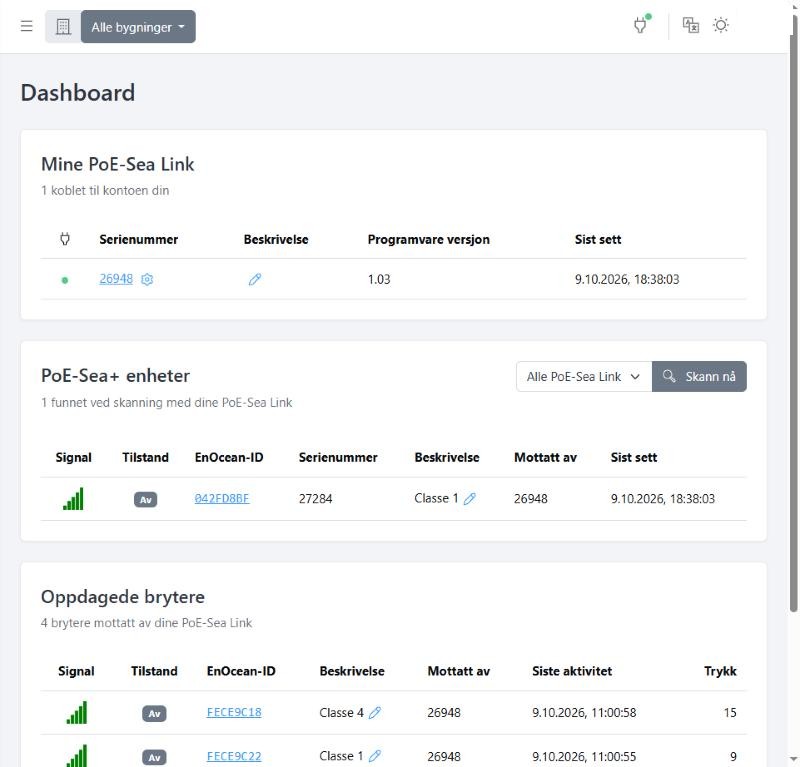
- Group the PoE-Sea+ by building, and filter all the views per school.
- Switch the Wi-Fi on or off remotely.
- Weekly schedules with up to 8 actions: on, off, lock or unlock the switches.
- Statistics and event log: activations, hours with Wi-Fi, the most used switches.
- User roles: read only, change the settings of the classrooms, or administer the buildings.
- Software updates of the PoE-Sea+ from the cloud service.
- In Norwegian, English, French and Dutch.
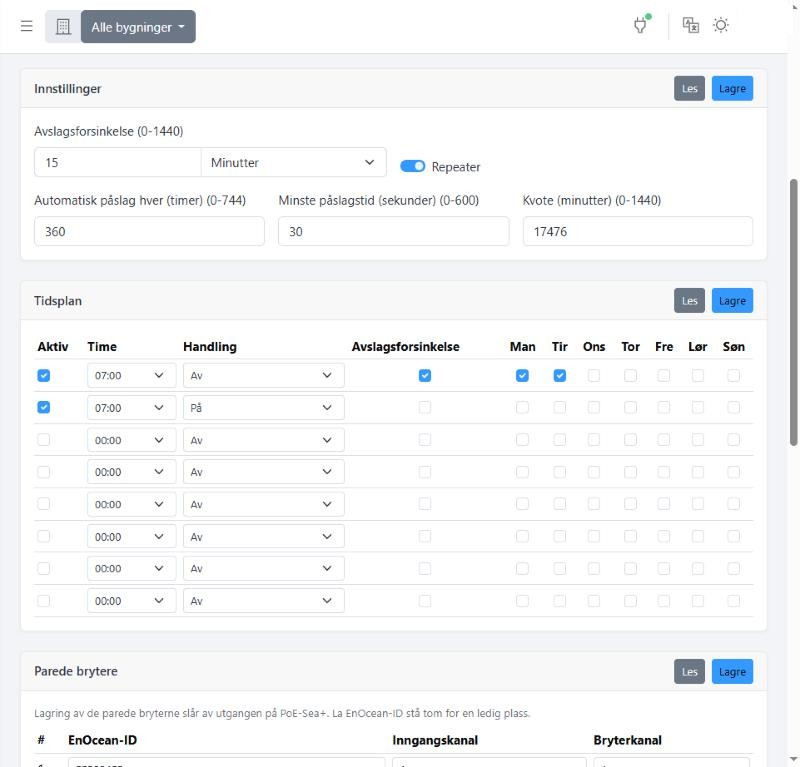
Delay before switching off, time quota and weekly schedule of a classroom.
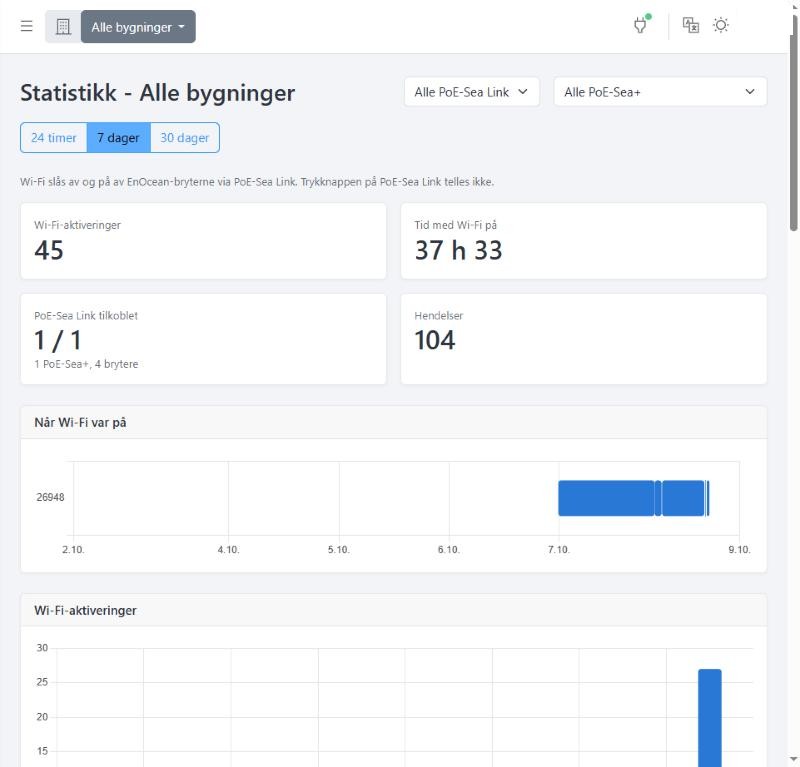
Activations and hours with Wi-Fi on, per day, for one school or for all.
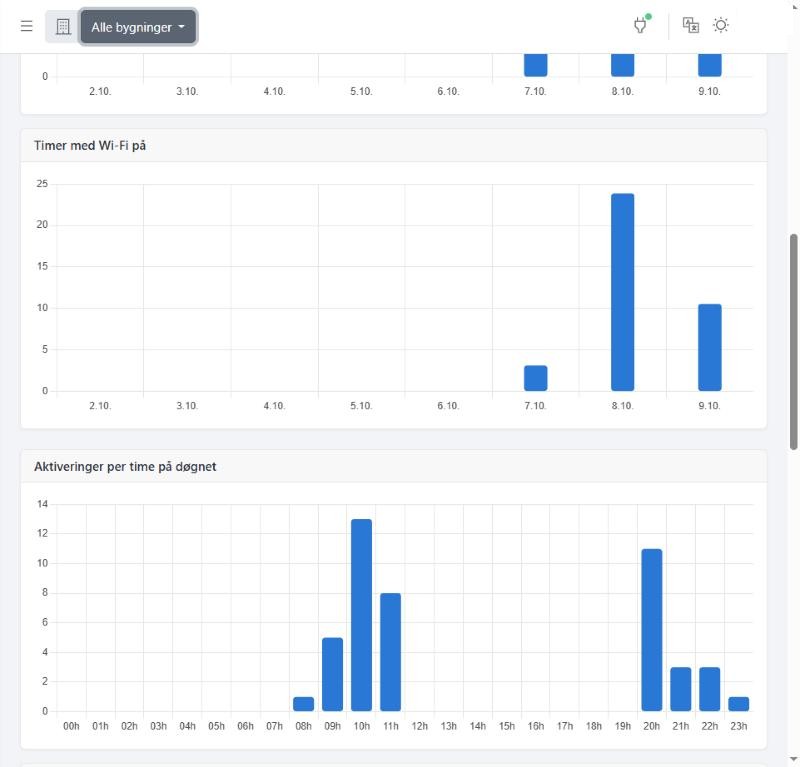
When is the Wi-Fi used? The activations per hour of the day reveal the use in the evening.
After the phones, the connection itself
The decree of the Wallonia-Brussels Federation of 13 March 2025 forbids the recreational use of phones and other electronic communication devices at school. It sends a strong signal: digital tools must serve learning.
One question remains: how does the school learn to control the connection itself? The Wi-Fi often stays on all day, even when nobody needs it.
France has taken a step ahead. Since 2015, article 7 of the Abeille law asks that the wireless access in the primary classrooms is switched off when it is not used for the digital teaching activities. This French law does not apply in Belgium: we cite it as a precedent and as food for thought.
PoE-Sea, from our exclusive partner PoE-Tic, answers exactly this need: Wi-Fi on demand, without replacing the existing installation. It is already deployed in many French schools.
Taken seriously, with rigour
The health and the well-being of the children deserve a particular attention. When the Wi-Fi access point is switched off, its radio emissions and its power consumption stop.
We take seriously the symptoms reported by the people who describe themselves as electrohypersensitive, without presenting as established a medical link that is not established today. Our approach is about the control of the uses, not a medical promise.
LiFi: the connection by light
LiFi and PoE-Sea complement each other: the Wi-Fi only when it is needed, and LiFi where a connection without radio waves is preferred.
LiFi transmits the data with light instead of radio waves. Units on the ceiling send the signal with invisible infrared light, and a small receiver connects the tablet or the computer.
Light does not go through walls: the connection stays in the classroom, which makes it more secure. It is also fast and stable, with a low energy consumption.
Since 2021, LiFi Solutions has supported schools that want a controlled digital education: with LiFi where a connection without radio waves is wanted, and with PoE-Sea to control the existing Wi-Fi.
A one-stop shop: LiFi Solutions advises school heads, parent committees, teachers and local authorities, from a simple advice to the complete study of the needs, then the purchase and the installation of the equipment, with the school kit of its partner Signify (Philips).
With PoE-Tic, we also offer PoE-LiFi (Trulifi by Signify) and MIELA, a mobile LiFi device that moves from classroom to classroom.
Visit a LiFi classroom: report of the RTBF in AubangeLiFi for the school, and beyond
The school kit
With Trulifi of Signify (Philips): transmitters on the ceiling send the infrared signal, a router connects them to the network of the school, and a USB key receives the signal on the tablet or the computer.
With LED relamping
LED panels of 60 × 60 cm with a built-in LiFi transmitter: the new lighting and the connection are installed together, and the lighting uses less energy.
MIELA, the mobile LiFi
A mobile LiFi device of PoE-Tic for education and health care, which moves from classroom to classroom.
Outdoors: Trulifi 6014
LiFi access points placed on street lights, which send the data at very high speed from one to the other. Tested since 2025 by Multitel in Mons, in different weather conditions.
Offices, care homes and hospitals
The light stays in the room, which protects the confidentiality of the data, and LiFi does not interfere with the other wireless systems.
Tourism and museums
With its partner Glorytech, LiFi Solutions proposes GRALL, an application that gives the visitors information about the place where they are, to the metre, indoors and outdoors.
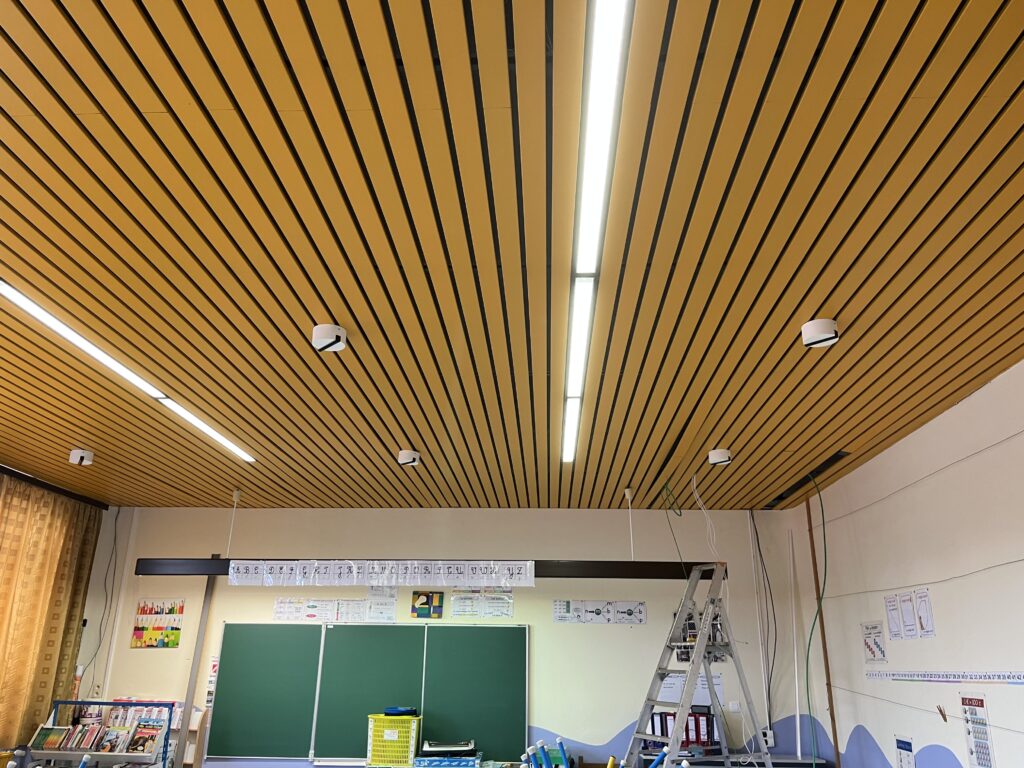
What a LiFi classroom needs
- About six transmitters for a classroom of 70 m², for up to 15 devices at the same time.
- About 1,500 euros per classroom (estimate of 2023).
- In Anderlues, 13 classrooms for 30,000 euros: the municipality pulled the cables, and LiFi Solutions installed and connected the units.
- A school can work with LiFi only, or with LiFi and its existing Wi-Fi, controlled by PoE-Sea.
LiFi classrooms already in use in Belgium
Since its creation in December 2021, LiFi Solutions has equipped schools and other places in Belgium with LiFi, with the Trulifi solution of its partner Signify (Philips).
Anderlues
In 2023, the École communale du Centre connected its 13 primary classrooms with LiFi, presented by the press as the first school to equip all its classrooms.
Flobecq
One of the first LiFi schools in Belgium. In November 2023, its LiFi classroom was inaugurated in the presence of Frédéric Daerden, Minister of the Wallonia-Brussels Federation in charge of school buildings.
Aubange
In 2022, the RTBF filmed the pupils of the école communale testing LiFi; the mayor wanted to extend it to other buildings of the municipality.
Uccle · Rixensart
A specialised secondary school of the Groupe La Cime in Uccle, and the école communale du Centre in Rixensart, the first school of Walloon Brabant with a LiFi classroom.
Beyond schools
A sleep clinic in Linkebeek, the solar sailing boat Solarwind, and since 2025 an outdoor LiFi test with the research centre Multitel in Mons.
A standard since 2023
LiFi is an IEEE standard (802.11bb): the equipment of different brands works together, and with Wi-Fi.
They chose LiFi
“A stable and secure internet connection is essential in the classroom, as some pupils already use connected interactive tablets.”
“It is very important for the schools of our municipality to have innovative, powerful and stable connection solutions, adapted to the needs of the schools.”
“Parents are more and more worried. It makes sense to set up this network in a school, for the sensitive children.”
“It is an innovative concept that limits the waves. Each classroom is autonomous.”
Pilot projects
Pilot projects have already been developed. We want to continue with lasting pilot projects, and document their teaching, economic and environmental benefits.
Schools and organising authorities
Your school volunteers? We present the approach to the management and to the teachers, and set up the pilot together.
Foundations and sponsors
Support a concrete educational project for young people, especially in the schools that welcome more vulnerable pupils.
Public authorities
We share our field experience with the policy makers, in a spirit of dialogue, without a sales approach.
On request: the impact and funding file, the teaching guide « École numérique 3.0 » and the illustrated booklet for families.
We work with
- Signify (Philips)
Trulifi, the LiFi equipment installed by LiFi Solutions - PoE-Tic
PoE-Sea, PoE-LiFi and the mobile LiFi device MIELA - Digilink Solutions
Installation of LiFi and LED lighting - Glorytech · GRALL
Geolocated information for tourism and museums - Digital Wallonia
The digital strategy of Wallonia
They talk about our LiFi classrooms
- RTBF, 2022
Une école d'Aubange teste la technologie LiFi, une connexion numérique grâce à la lumière - RTBF · Les Niouzz, 2022
Le Li-Fi à l'école, comment ça marche ? - LEDs Magazine, 2022
Four Belgian schools deliver internet via infrared Li-Fi - Notélé, 2023
L'école flobecquoise La Crête expérimente depuis deux ans le LiFi
Who we are ?
LiFi Solutions ASBL has been supporting schools towards a more educational, more inclusive and better controlled digital transition since 2021.
LiFi Solutions is the exclusive partner of PoE-Tic in Belgium. PoE-Sea is designed with PoE-Tic (France), and developed and produced by Wattlet AS (Norway).
We work with school managements and educational communities, and share our field experience with the public authorities, in a spirit of dialogue.
LiFi Solutions works in Belgium and in Luxembourg, for schools, care places, companies and public authorities.
Cédric Gelpi, president · Marc Vanveckhoven, sales director
Would you like to start a pilot project?
Your school volunteers, or you want to support a pilot? LiFi Solutions presents the approach to you and builds the project with you.
Contact us Already a customer? Log in